AI alt-text service for multilingual product images
A lights-out service that writes SEO and accessibility-ready alt text for product images in 25+ languages, then embeds every language variant into the image file itself as XMP metadata.
Every product image on a website needs alt text — for screen readers and WCAG compliance, and for search. With tens of thousands of images across a dozen or more markets, writing it by hand is not a backlog, it is an impossibility. So I built a service that does it without a human in the loop: drop an image in a folder, and it comes back out described, translated, and carrying its own descriptions.
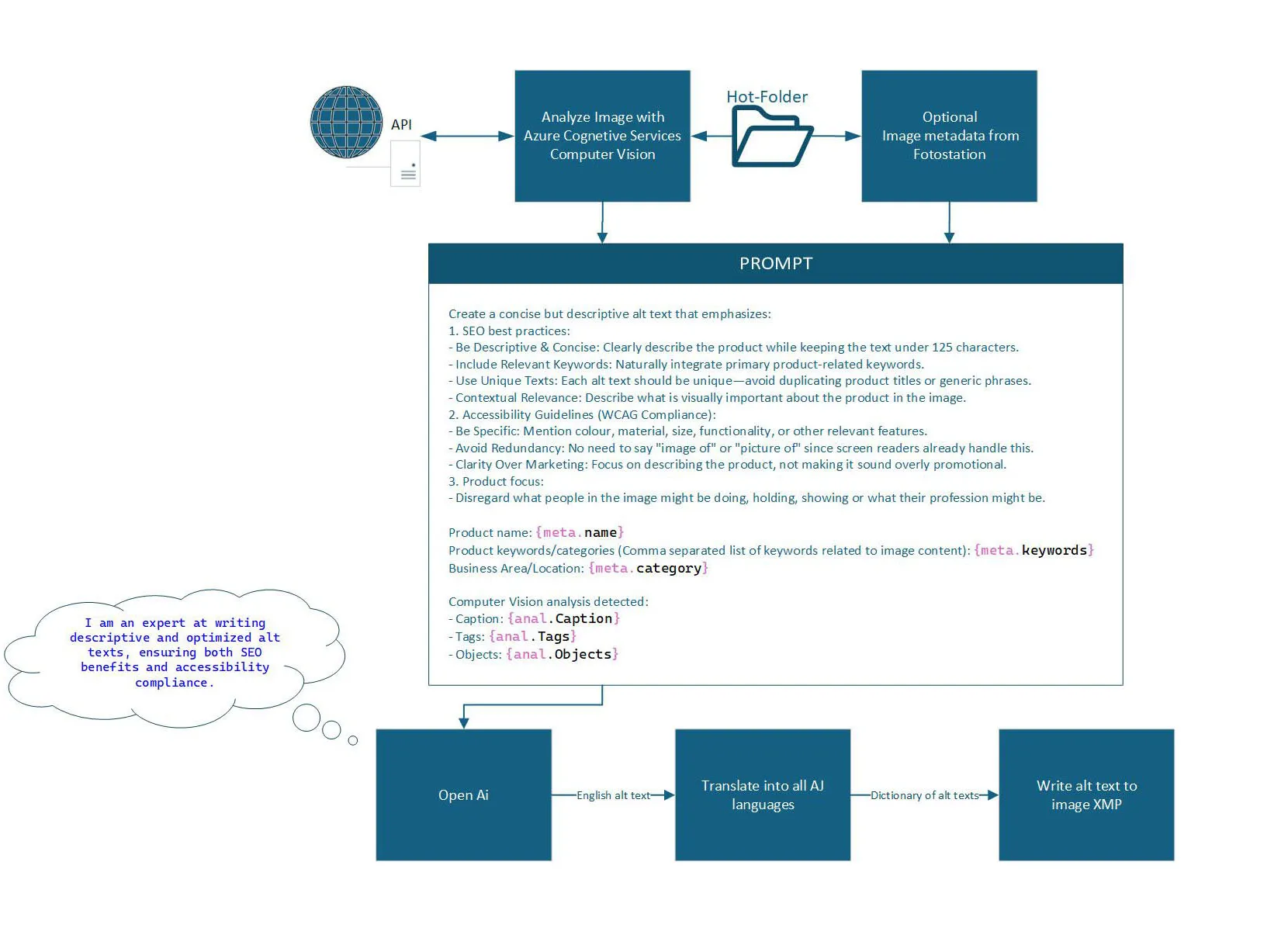
What it does
- Ingest — an image arrives via a watched hot-folder or the REST API.
- Analyse — Azure Computer Vision detects objects, tags and a caption.
- Describe — those signals, plus optional product context such as name, keywords and business area, go into a carefully engineered prompt, and OpenAI writes a concise English alt text tuned for both SEO and accessibility.
- Translate — Azure Translator renders the description into 25+ languages.
- Embed — every language variant is written into the image’s XMP metadata, as a Dublin Core
dc:descriptionlang-alt structure, using ExifTool. - File — processed images move to Done or Error folders with their JSON results.
The prompt is the product
The output quality comes down to prompt engineering, so the service instructs the model against an explicit rubric: stay under 125 characters, integrate product keywords naturally, describe material, colour and size, skip the “image of…” redundancy that screen readers already handle, choose clarity over marketing language, and describe the product rather than whatever the people in the shot happen to be doing. Per-image parameters — keywords, business area, even temperature — can be supplied in an XML sidecar file when a particular image needs a firmer hand.
How it’s built
| Area | Technology |
|---|---|
| Host | Hybrid Windows Service + Web API on .NET 9 |
| Management UI | Blazor Server admin for settings and on-demand processing |
| Image analysis | Azure Computer Vision |
| Description | OpenAI (GPT) with a template-driven, rubric-based prompt |
| Translation | Azure Translator, 25+ languages, BCP-47 |
| Metadata | XMP via ExifTool; ImageMagick for pre-processing |
| Secrets | Azure Key Vault |
| Architecture | Modular DI, hot-reloadable settings, fully unit-tested |
Engineering highlights
- Two front doors, one engine. The same processing core serves a background folder-watcher for bulk unattended runs and an on-demand Web API and Blazor UI, hosted together in a single hybrid Windows Service and web process.
- Robust unattended ingestion. The folder watcher waits for files to settle, checks for locks, retries on failure and processes images concurrently under a throttle — the hardening that separates a demo from something that runs all night without supervision.
- Metadata that travels with the file. Writing the alt text into XMP rather than a side database makes the descriptions portable: they follow the image into any downstream system that reads standard metadata.
- Testable by design. All file I/O goes through an abstraction, so the whole pipeline is unit-tested against an in-memory filesystem.
Impact
An impossible manual task became a lights-out service. Every processed image comes out accessibility-ready and SEO-optimised in every language the business sells in, with the descriptions baked into the file itself.
The service’s Blazor management UI runs behind the corporate network, so the diagram above is the project’s own architecture illustration rather than a screenshot.